|
Firewalls for local network Sergey V. Gordeychik, [email protected] Installation of a firewall is the basic requirement for building a secured network. Years of their existence made firewalls more functional and more secured and developed them from simple packet filters into devices with possibility of stateful and content filtering. But all of them can control only perimeter of network, not the LAN. Nowadays the principal security mechanism of a firewall is traffic filtering. Firewall must meet our requirements and be capable to analyze and manage packets, coming through its interfaces according to the security policy. So, if a packet matches the ruleset, it will be translated, otherwise rejected. Different types of firewalls depend on their depth of filtering and filtration criteria. For example, a simple packet filter treats each packet separately and uses headers of network and transport layers as filtration criteria; mail content filtering system can gather all the e-mails content from different packets and examine not only headers of the application layer protocol (SMTP), but also data translated in these e-mails according to the security policy. Firewalls are located at a network perimeter e.g. at access points, where local network is connected to other networks for business needs. Network perimeter is called an access point because external networks are not trusted resources; they have different security policies and are managed by different people. As usual such an access point is a connection to the Internet. Development of the “defense in depth” concept in information security made the meaning of “network perimeter” almost transparent. Nowadays, network perimeter also means an access point between two segments of the corporate network, VPN gateways, wireless segments and even a network card, which connects a PC to local area network. The need to keep resources safe from internal and external users (who can access these resources from local workstations) made the local network security of great importance. A traffic filtering in a local segment makes it possible to secure network from attacks on unused or misconfigured network services, to control the activity of network worms and to block illegal users` actions, such as creation of network shares, installation and use of network services. Lots of firewalls are not suitable for traffic filtering in a local network, but there are some ways to solve this problem. SegmentationThis way could be used, when there is a need to divide network into servers` and users` segments. In this case, firewall inspects traffic between client computers and servers. Besides common problems, connected with rebuilding network topology and changing IP addresses, it will not be possible to control traffic inside a segment. This means, that vulnerability of one of the servers may allow an attacker to bypass firewall restrictions and gain access to other servers in this segment. The same is valid for users` segment. Traffic filtering and switchesAs switches are the basis for modern local networks building the possibility of traffic filtering by the very devices would be a solution for the administrator. But most filtering models are bound by data-link layer, for instance by possibility of binding MAC addresses to special interfaces. Some switches support traffic filtration on different layers of the OSI model. For example, Cisco Catalyst starting with 3550 can bind inbound access lists to switched ports and inspect packets on the third and the fourth layer of the OSI model – IP/TCP/UDP protocols. More powerful devices such as Firewall Services Module (FWSM) for Cisco Catalyst 6500 Series make possible to create filtration rules on all the OSI layers, including application layer. The main disadvantage of traffic filtering on switches is their high price. But hopefully in the nearest future traffic filtration capabilities will be build-in also into simple devices. Besides it appears to be very difficult to manage a distributed system when different filtering rules are applied to different ports on different switches. A balancing factor is the absence of the necessity to use complicated rules of filtering on the switches of lower level. It is sufficient to allow transferring packets outside the local network (into the Servers` segment and other segments of the network) and deny the remaining traffic. A more detailed filtering will be performed on the boundaries of network segments. Traffic filtering and bridgingRecently network bridges, executing functions of bridging firewalls, have become increasingly popular. Filtering bridge receives packets at one of network interfaces, and not only repeats it but also checks it with the help of packet filter. The most popular solution is a filtering network bridge based on IPtables (http://bridge.sourceforge.net/docs/Firewalling%20for%20Free.pdf). These devices do not differ much from common firewalls but make it possible to filter the network traffic without the change of network structure. But the problem of insecurity remains. Personal firewallsThe most effective solution of traffic filtering inside local network area is installation and corresponding configuration of a personal firewall on each computer. A personal firewall filters network activity of each computer according to the existing policy and allows interactions only with services, servers and clients that are needed for solving tasks of the employer. This approach helps to control access to the network services and make the network more secure. But there exist some problems connected with this solution and which could lower the entire security level. A personal firewall could be deleted by a user, disconnected by a virus or there a denial of service condition because of a fault in software may occur. Besides the use of a personal firewall doesn’t defend from malicious activity of users who have connected his laptop to the network. A serious problem is reconfiguration of a “distributed” firewall. For instance, if the traffic filtering is being performed with the help of IPSec and is being managed through the Group Policy, any change in filtering rules made by an administrator may take a long period of time to be distributed over the network. An administrator can make mistakes in configuration of personal firewalls, e.g. he can block user’s interaction with a Domain Controller, or Central Management System. These actions may have serious impact. The use of Intrusion Detection SystemsTo reduce the enumerated disadvantages of personal firewalls it is possible to use Network Intrusion Detection Systems (NIDS). A lot of such software can block TCP session according to different parameters that do not satisfy the local security policy.
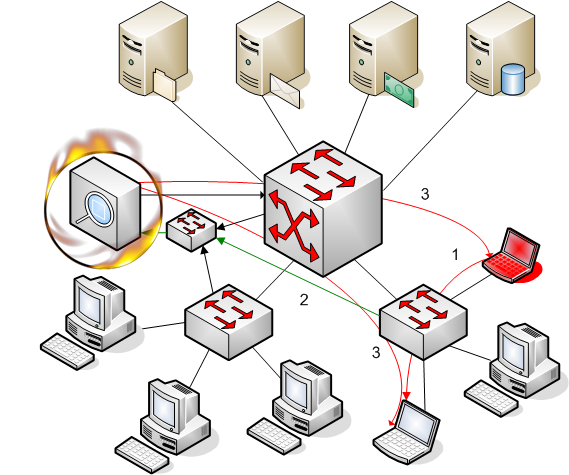
To block TCP connection it is enough to know the IP address and TCP port numbers of a sender and receiver and current sequence number of a TCP session. NDIS has such information because it listens all the connections of a separate network and can terminate TCP connections coming through the controlled segment:
Picture 1. LANFirewall “in action”
1. A malicious user sends a connection request disabled by the security policy. 2. NDIS receives the request from the mirrored port of the switch. 3. NDIS send RST packets to receiver and sender.
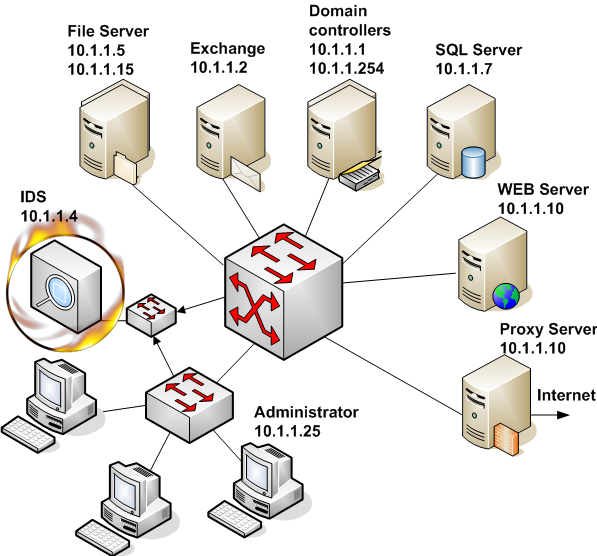
The use of this feature makes it possible to describe allowed traffic in local network and send RST packet to all other TCP connections. In this case an attempt to use unauthorized TCP connection will result for the user in receiving an RST packet and information about unexpected session termination. We do not forbid installation of different services, but it will only be possible to use them at local computer. For protocols, which do not need established connection (UDP, ICMP) we send ICMP Destination Unreachable and ICMP Port Unreachable. Besides, information about these connections will be logged. ImplementationLet’s discuss implementation of such a solution for traffic filtering in a small local network. The network is based on Microsoft products and consists of 2 Domain Controllers, an Exchange Server, several File and print Servers, a firewall, WEB and SQL Servers. (See picture 2)
Picture 2. Scheme of network to be secured
Before the system configuration it is necessary to determine the traffic filtering policy, e.g. we should single out which servers and protocols will be allowed. The policy must be based on functionality and tasks of each server. Network monitor (sniffer) could be a useful tool at this stage. The main problem in realization of this solution is connected with software that opens several independent connections and uses dynamic sockets. The most important Windows based network service which uses dynamic sockets is RPC. Unfortunately modern IDS don’t own a powerful RPC preprocessor to identify different RPC applications. That’s why we should use another method. The easiest way is to bind an RPC services to a static port numbers. Security Configuration Manager would be the best solution but its editor doesn’t correctly process adding a new registry parameter which contains a symbol “/”. An alternate way to bind RPC services to static port numbers is the use of administrative templates (.adm files). An example of such a file to configure services at Exchange server and Domain Controllers is shown below.
This file should be added to administrative templates with the help of the Group Policy editor (Computer Configuration – Administrative Template – Add/Remove Template). You won’t see template parameters by default because they are located behind HKLM\Software registry keys. To configure template parameters you’ll need to turn off “Show Policies Only” in the “View” menu. On Windows 2003 Server you’ll need to open View->Filtering and turn off “Only show policy settings that can be fully managed”. The next stage is to choose the method of passing traffic from local segment to your IDS. As the network is based on switches, frames are transported only between the sender and receiver of a packet. It is necessary to change the routes of packets and make them pass through the IDS network interface. Taps, hubs and span ports can be used for this reason.
As an NIDS we use free intrusion detection system called Snort (www.snort.org). This system was designed for Unix based systems (though there are also Windows implementations) and we use Linux as a basic operating system for Snort. Actually it is possible to use any of commercial intrusion detection systems for these tasks but it would be much better to use one for monitoring malicious activity in allowed traffic. Snort must be compiled with Flexible Response functionality to be able to terminate sessions. For this purpose it is necessary to have libdnet library installed at your system.
# ./configure --enable-flexresp
Then snort through snort.conf is configured.
Section 1 describes variables such as file path, IP addresses of internal and external networks. Section 2 includes preprocessors for collecting fragmented packets and sessions. Section 3 describes the order to process IDS rules. In section 4 will be attached the permit.rules file, containing rules for traffic filtering is attached.
Section 1 of the permit.rules files describes IP addresses of servers according to their role in corporate network. Servers could be members of different groups. For instance, FILESRV group includes also Domain Controllers which use shared folders for storing Group Policy, and Database Servers in case they support Named Pipes network library. Section 2 consists of filters, which describe allowed traffic. The filter starts with a keyword pass, contains network address and port number of sender and receiver of the packet. In our example it is allowed to use TCP and UDP for different interactions, but we advise not to use UDP because of its unreliability. The ruleset for DNS protocol describes connection with DNS clients in network and also queries sent by DNS servers to firewall to allow Internet names and addresses resolution. All the rules for other protocols are described in a similar way. In the Exchange section we allow interactions between clients and Exchange services (RFR, NSPI, Information Store). These services were bound to static ports (2000, 2001, 2002) with the help of administrative template. Filters for CIFS/SMB/NetBIOS services describe traffic in the network between clients and File and print Servers. In this case NetBIOS traffic is allowed, but if there is no old client software it is recommended not to use this protocol. Section 3 describes traffic which should not be filtered. These are interactions between Domain Controllers and Exchange. Section 4 terminates sessions which were not permitted in section 3. The IDS must be started with –o option which makes it necessary to follow the order of application of rules in the configuration file. To start IDS as a daemon you should use –D option. In most cases the startup option would be as follows:
# snort –c /etc/snort/snort.conf –o –D
Information about policy filtering violation will be logged into /var/log/snort/alert. ConclusionThe offered solution is a not full-fledged substitution of traditional means of network traffic filtering, but it can be used alongside with them executing the function detective security control. Besides installation and configuration of such a solution appears much easier if the intrusion detection system has already been implemented into the network as there appears a possibility of the use of already existing network infrastructure. |